
Your saved setup lives only in this browser, so it cannot wander across domains by itself like a competent little data goblin. Use the transfer button to bring it with you.
Pinned panels and workspace layoutCustom SpawnTimers and Talking Wall correctionAlert selections, panel color, and time format
Click a boss to view details. Tiny miracle, information without accidental alarms.
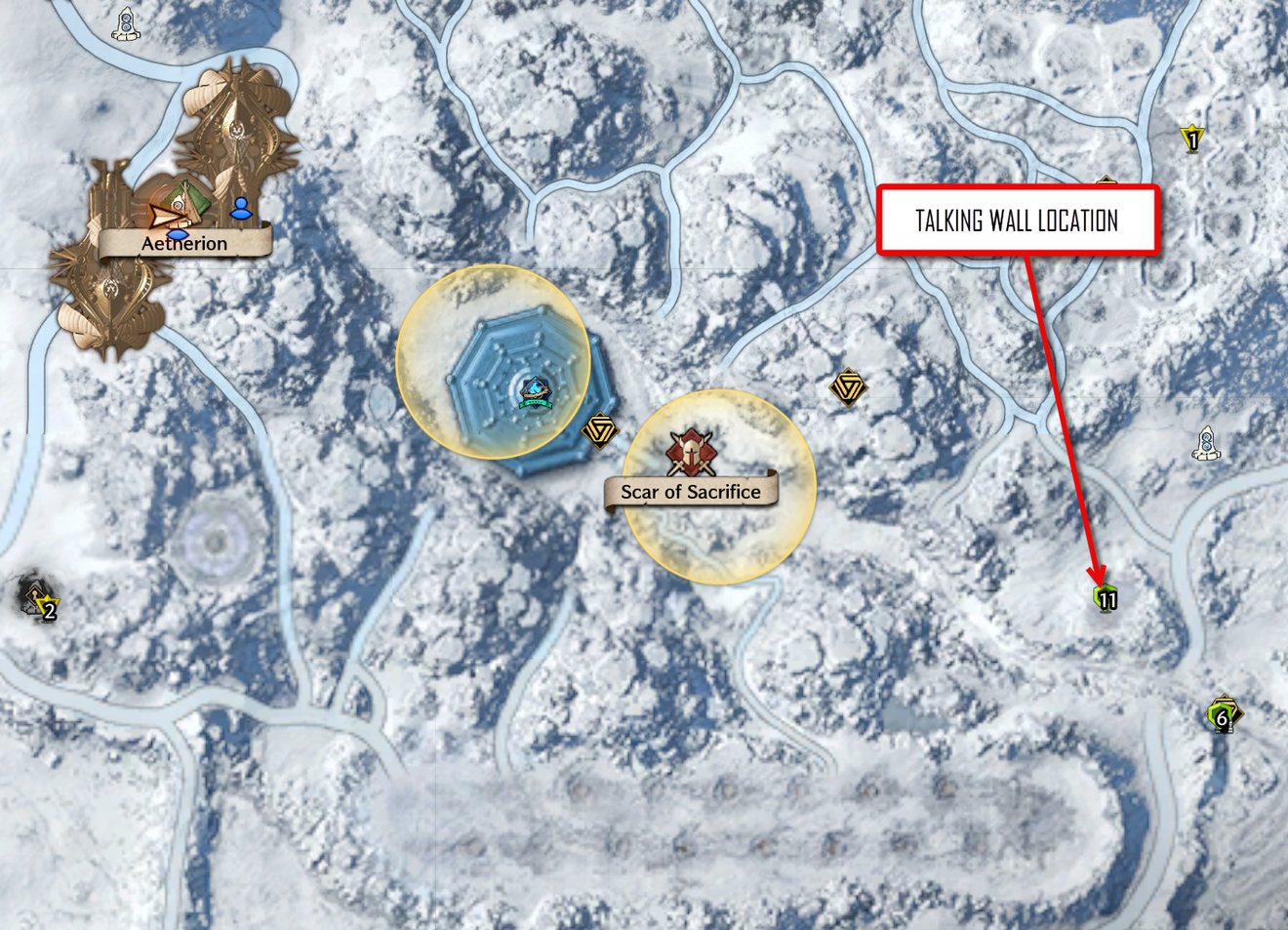
Talking Wall Location
Talking Wall location for Nix. Use this map to find the spawn point near the numbered marker shown on the right side of the map, east of Aetherion and Scar of Sacrifice.
YOUR THRONEWATCH ACCOUNT
Settings
My Account
Choose your ThroneWatch avatar. Saved across your devices.
Notifications
Background Alerts
Permission applies only to this browser. Lock-screen previews stay generic and never include Discord names, timer names, or trade details.
Checking background alert support…
Notification categories
9 / 9 enabledReminder Timing
Warning minutes for alarms you set on the homepage. Content is controlled by Notification Categories.
Sounds & Timers
Uses the notification categories you have enabled. Browser playback restrictions still apply.
Privacy & Sessions
Discord verifies your sign-in. Players see your ThroneWatch avatar and in-game name.
Discovery progress
Sessions
Sign out of every device connected to this account.
Create up to 6 countdowns for respawns or anything you want to track. Enter a name, the starting time under Killed at, the duration, and how many minutes before it ends you want a warning.
Timers are saved only in this browser and device; other players cannot see them. Use View all timers to edit, restart, or remove them.
Alerts use your existing sound and notification settings. Browser notifications require permission; delivery can depend on your browser, device, and background-alert settings.
Edit Custom SpawnTimer
Saving recalculates the due time from the edited kill time and duration. Existing alert flags reset so the updated timer can notify correctly.
LOCAL OWNER TESTING
Throne Watch Admin Console
Simulated app timeReal time
Cycle—
Daily AscendedLoading…
Time & cycle
These overrides stay in this tab and affect only your browser.
Night overlay color
Preview temporary nighttime haze colors. These changes stay in this tab and reset with the admin overrides.
Preview off · live game phase restored
Whole-site color preview
Test the full site with blended colors. Text sizing stays separate below, and meaning-based warning, boss, and status colors remain intact.
Using the current site colors.
Live text sizing
Adjust each interface section independently. Changes stay in this tab so you can test without changing the live design.